Laboratory Week 12 - Example WAP Services and Programming
Learning Objectives:
- Understand the concept ofd WAP services.
- Know some of the popular WAP services currently available.
- Understand how WAP applications are developed.
Before doing the tutorial, please read:
- Week 11 lecture on Wireless Internet Services.
Software required:
This lab requires use of Netscape Navigator 4.x or Microsoft Internet Explorer 5.0+ web browsers, and the Nokia WAP Toolkit. The software is available in the internal labs. External students may download the required software from the unit's downloads page.
Exercises:
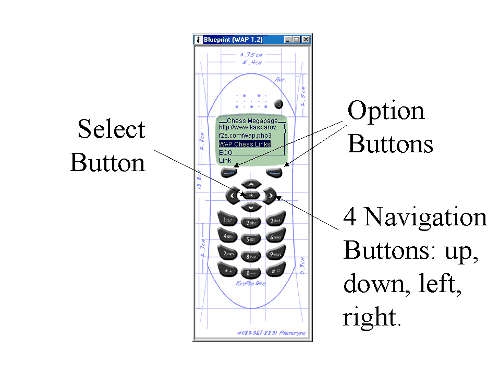
Start up the Nokia WAP toolkit. In Windows, click on the Start button, and select Programs>Nokia WAP Toolkit>WAP Toolkit. This will bring up two windows. The one on the left will display the application WML code. The window on the right (the one which looks like a skeleton of a mobile phone - see image below) shows what the code will display on a standard Nokia-type mobile phone. Other mobile phone brands will have similar keys.
The operation of the simulation is similar to that of common phones, with slight variations. To navigate around a WAP sites (ie. a set of WML files), you use the up and down navigation buttons to scroll up and down the screen. To select a highlighted function on the phone screen click once on the centre button in the navigation set. The two Option buttons perform different functions at different times. If the Option buttons does something, there will be words indicating what it does on the screen immediately above the buttons.
If you need to type in characters, click on the phone's key corresponding to the characters. Most characters are grouped in 3 or 4 for each key on the keypad - there aren't enough keys for one key per character. To get a certain character, type the corrsponding key a certain number of time very quickly. For example, the characters 'a', 'b' and 'c' are all grouped on the key for '2'. To type 'c', press the '2' key 3 times very quickly.
You can also use your computer's keyboard for input, but avoid doing so, since it will not give you a realistic indication of how hard it is to type characters on a mobile phone keypad.
- Using the File>Open menu item, look at the following example WML files supplied with the toolkit one at a time. For a standard installation, they should be in the directory C:\Program Files\Nokia\WAP_Toolkit_2.0\Samples.
Welcome1.wml (a simple welcome screen)
weather.wml (a simple static weather information display)
currency.wml (a currency converter)
morgage.wml (a morgage claculator)Click on the "Show" button on the left window to display the decks in the right window. Learn to use the phone's navigation arrows to move up-down-left-right through the decks.
- Using your web browser, visit the site www.wap.com/services. Here, you will see a listing of different categories of public WAP sites and services currently available, as well as their WWW equivalent versions. Look at some of the links from the different categories.
You can also click on the WAP links using your web browser. This will bring up a Java WAP simulator applet, which operates similarly to the Nokia toolkit's phone. It will take much longer to load the applet though, so please be patient if you choose to use the applet instead of the Nokia simulator.
- After looking at enough public WAP sites, you will see that most of the public WAP sites are poorly designed, implemented and maintained. Most of the good WAP sites are actually available only to mobile paid subscribers. Have a look at descriptions of two example such paid services in Australia:
- Telstra's WAP services
- Optus' NETWorker WAP services (click on "preview" at the bottom of the page)
- Consider the following questions, and discuss with your tutor.
- Are all the services you saw useful to someone on the move?
- Are the services necessary, or would they be better left as normal WWW sites?
- How do the WML pages look, compared to conventional web pages? Are they adequate when viewed through the small mobile phone screen, and accessed using the limited input mechanism of the mobile phone?
- Estimate how much time you spent visiting each site. Would be current billing rate of about 5 cents per 30 seconds in Australia mobile data service be a major factor in people using the service?
For a quick introduction to writing WML and WMLScript, try this tutorial at webreference.com which makes use of the Nokia Toolkit. WML and WMLScript should be very easy if you are comfortable with HTML and JavaScript.
Remember to read the week's development on the Internet by scanning through relevant articles in the IT section of Tuesday's the Australian newspaper - use the online version or the physical copy in the University library. Get into the habit of keeping up with current developments. Test your knowledge of major developments by going through the Good News Week self-tests.
H.L. Hiew
Unit Coordinator
Document author: H.L.
Hiew, Unit Coordinator
Last Modified: Sunday, 28-Oct-2001 18:35:38 MST
Disclaimer & Copyright Notice © 2001 Murdoch
University